Liquid error (sections/image-banner line 171): invalid url input
If you’re exploring how to choose a laser engraver, you’re probably asking yourself: What type of machine do I need? How much should I spend? What features matter most? With so many options on the market, from budget hobby models to professional-grade CO₂ systems, it’s easy to feel overwhelmed.
Key Takeaway
This guide will walk you through everything you need to know about choosing a laser engraver—including workspace size, material compatibility, machine types, budget considerations, and long-term value. Whether you’re a beginner, a hobbyist turning pro, or a business scaling production, these tips will help you avoid costly mistakes and find the perfect machine for your needs.
1. Why Choosing the Right Laser Engraver/Cutter Matters
A laser machine isn’t just another tool—it’s an investment. Pick the wrong one, and you may end up with:
- Slow production speeds that waste time.
- Poor cut quality that requires extra sanding and finishing.
- Limited capability that forces you to upgrade sooner than expected.
But when you take the time to research how to choose a laser engraver or cutter, you ensure your purchase pays for itself through faster production, consistent results, and reliable performance.
2. How to Choose a Laser Engraver/Cutter
Step 1: Define Your Project Needs
Before buying, ask yourself:
- What objects will you work on?
- Small to medium projects → A desktop laser like the OneLaser X Series (XRF or XT).
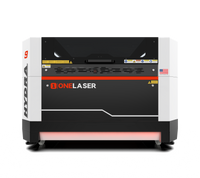
- Large projects → A cabinet-style laser like the OneLaser Hydra Series.
- What materials will you use?
- Wood, acrylic, leather, and paper are standard.
- For engraving coated metals or producing ultra-precise detail, consider an RF tube upgrade.
- What’s your intended use?
- Hobby projects – Small footprint, affordable desktop units.
- Side hustle or small business – Professional machines with reliability and speed.
- Scaling production – Industrial-grade systems with large beds and dual-laser options.
Step 2: Consider Workspace Size
“How much space do you have?” is one of the most important questions in choosing a laser engraver/cutter.
- Desktops (X Series): Fit on a workbench, ideal for home studios or small shops. Can be upgraded with a riser base and rotary for tumblers, mugs, and oversized items.

- Hydra Series (Cabinet Lasers): Larger footprint but offer bigger workbeds, motorized height adjustment, and more cutting power. Perfect if you have space in a garage, workshop, or maker space.

Step 3: Desktop vs. Cabinet Lasers
One of the most important decisions when learning how to choose a laser engraver is whether to go with a compact desktop unit or a larger cabinet-style machine. Both have advantages, but the right choice depends on your space, workload, and long-term goals.
Desktop Lasers (X Series) – Compact, Professional, and Affordable
Desktop laser engravers like the OneLaser X Series (XRF and XT models) are designed for makers, hobbyists, and small businesses who need professional results without taking up a lot of room.
Advantages of Desktop Lasers:
- Small Footprint: Fits easily on a workbench or in a home studio. Perfect if space is limited.
- Affordable Entry Point: Lower initial cost compared to cabinet systems while still offering professional-grade quality.
- Expandable Options: Add a riser base for taller objects or a rotary for cylindrical items like tumblers and mugs.
- Great for Beginners: Intuitive setup and user-friendly software make it easier to get started.
Discover the OneLaser X Series!
Cabinet Lasers (Hydra Series) – Industrial Power for Scaling Businesses
High Performance laser machines like the OneLaser Hydra Series are built for users who want more power, a larger work area, and faster production capacity.
Advantages of Cabinet Lasers:
- Larger Work Area: Cut and engrave bigger pieces such as signs, furniture panels, or batch orders of smaller items.
- Motorized Bed: Easily adjust for thicker materials and taller projects.
- Power Options: Available with glass CO₂ tubes for strong cutting power or RF metal tubes for ultra-precise engraving.
- Durability and Speed: Designed for continuous operation, with faster engraving speeds (up to 1200 mm/s) and higher reliability.
- Upgrade Path: Ideal for businesses moving beyond desktop machines or replacing an older CO₂ system.
Discover the OneLaser Hydra Series!
Step 4: Hobby vs. Professional Laser
One of the biggest decisions is whether to invest in a hobby laser or a professional laser.
Hobby Laser (Entry-Level)
- Low upfront cost.
- Often diode-based, limited cutting ability.
- Fine for testing or light engraving, but not suited for business use.
Professional CO₂ Laser (X Series or Hydra)
- Speeds up to 1200 mm/s with 3G acceleration.
- Reliable performance with minimal downtime.
- Built to scale with your growing workload.
- Delivers consistent, repeatable quality.
👉 If you’re serious about selling products or growing a business, always choose a professional CO₂ laser engraver over a hobby diode machine.
Step 5: Don’t Just Look at Price—Look at Value
Many buyers make the mistake of choosing a laser cutter based only on cost. But the cheapest option isn’t always the best.
- Build Quality: A durable frame and high-grade components ensure accuracy and longevity.
- Speed & Efficiency: Faster lasers save you hours of work and increase your output.
- Support & Training: Professional brands like OneLaser provide US-based support and onboarding.
- Future-Proofing: Features like cameras, conveyor feeders, and rotary compatibility extend machine life and usefulness.
As our highlights, “Time is money. A high-quality machine cuts and engraves faster, which means more money back in your pocket.”
Step 6: Plan for Accessories and Expansion
When asking “How do I choose a laser engraver?”, think about the accessories you’ll need:
- Rotary attachment: For tumblers, mugs, bottles, and other cylindrical objects.
- Riser base: Expands the work area for taller projects.
- Air assist upgrade: Reduces char and improves cut quality. Learn more: How to Upgrade Your Laser Engraver with Air Assist
- Camera alignment: Helps with precision placement and contour detection.
Make sure the machine you choose is compatible with these add-ons.

Step 7: Factor in Budget and Financing
Not all budgets are the same—but that doesn’t mean you should settle for the cheapest option.
- Entry-Level Investment: Desktop lasers (X Series) balance affordability with professional quality.
- Mid-Range Investment: Cabinet lasers (Hydra Series) provide larger work areas and scalability.
- Financing Options: Many brands, including OneLaser, offer financing to make professional machines more accessible.
The key is to match your machine to your long-term goals—not just your short-term budget.
3. Real-World Scenarios: Choosing the Right Machine
Here are a few examples to make choosing a laser engraver easier:
- Hobbyist / Beginner: Limited space, wants to engrave wood signs, gifts, or acrylic décor → XRF desktop laser.
- Small Business Owner: Running an Etsy shop selling tumblers and wood décor, needs faster production → XT desktop laser with riser base + rotary.
- Growing Business: Expanding into signage, furniture, or batch orders → Hydra 9 or Hydra 13 cabinet machine with glass tube for cutting.
- Precision Engraver: Specializing in detailed engraving (jewelry, logos, fine art) → Hydra with RF tube for accuracy.
Let's Hear from Our Community!
4. Checklist
- What size projects will you work on?
- What materials do you need to cut/engrave?
- How much space do you have in your workshop?
- Do you need portability or industrial-scale power?
- What accessories (rotary, riser, air assist) will you need?
- Are you buying for hobby, side business, or full production?
- What’s your realistic budget—and what value do you expect long term?
Answering these questions will guide you toward the right machine.
5. FAQs
1. How do I choose a laser engraver for beginners?
Start with a desktop laser like the OneLaser X Series. It’s compact, affordable, and professional-grade—ideal for small projects and limited spaces.
2. What’s the difference between a hobby laser and a professional laser?
Hobby lasers (often diode) are cheaper but slower and less reliable. Professional CO₂ lasers cut faster, last longer, and handle more materials, making them better for business.
3. How much space do I need for a laser engraver?
A desktop laser fits on a workbench, while cabinet-style machines like the Hydra need more floor space but offer larger work areas and more power.
4. What materials can a CO₂ laser engraver cut or engrave?
Wood, acrylic, leather, paper, rubber, and coated metals are common. For precision on fine details, consider an RF laser option.
5. Should I buy based on price or value?
Always buy on value. A high-quality machine saves time, reduces downtime, and delivers consistent results, making it more cost-effective in the long run.
Have Questions? Contact Us Now!
Final Thoughts
Learning how to choose a laser engraver is about more than just comparing specs. It’s about aligning your project needs, workspace, and budget with the right type of machine.
- For hobbyists and small spaces, the X Series desktop machines offer professional quality at an affordable price.
- For businesses and larger projects, the Hydra Series delivers industrial-grade performance with scalability built in.
- No matter which you choose, remember: don’t just look at price—look at value, reliability, and support.
By asking the right questions and planning ahead, you’ll make a purchase that pays for itself through consistent performance and long-term success.