Liquid error (sections/image-banner line 171): invalid url input
Laser cutting has opened the door to endless creative possibilities, and one of the most delightful projects you can make during the holiday season is Christmas tree ornaments. They’re small, detailed, easy to personalize, and perfect for both gifting and selling.
Whether you enjoy making sentimental keepsakes or want to stock your shop with seasonal items, creating custom ornaments is a rewarding project that works beautifully with plywood, acrylic, and layered designs.
Key Takeaway
In this guide, you’ll learn how to create beautiful, layered wood ornaments using a laser cutter. We will walk through the entire process, from loading your materials and setting up the design in LightBurn to cutting, assembling, and painting.
The example project below uses a layered doorway ornament, but the same method applies to trees, snowflakes, houses, initials, pets, or any layered holiday design.

1. What You’ll Need to Get Started
Before beginning the cutting process, make sure you have the essentials prepared.
Materials
- 3mm plywood sheet
- Ornament design file (DXF, SVG, or layered template)
- Glue, Paint (spray paint or acrylic)
- String, twine, or ornament hooks
Tools
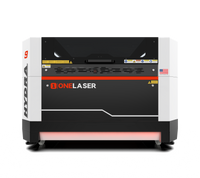
- OneLaser Hydra 9
- LightBurn software
- Sandpaper or cleaning wipes for edge cleaning
The Hydra 9 is particularly helpful for layered ornaments because it offers consistent power, smooth cutting results, and easy autofocus setup, important for keeping thin layers crisp and clean.
2. Step-by-Step: How to Make a Laser Cut Christmas Ornaments
Let’s go through the process step-by-step so you can achieve professional-quality results.
Step 1: Load Your Plywood Sheet into the OneLaser Hydra 9
Start by placing the plywood sheet onto the machine’s working bed. Ensure that:
- The material is flat with no warping
- Edges are secured with magnets or hooks
- Dust or leftover soot is removed from the bed
Any unevenness can affect how cleanly your ornament pieces cut, especially thin or delicate parts like small windows or frames.
The Hydra 9’s stable bed and autofocus system ensure that your cut depth stays consistent, which is essential for thin plywood.
Step 2: Import Your Ornament Design into LightBurn
Open LightBurn and load your ornament file. If your project is layered, like the doorway ornament shown, your file may include multiple color-coded pieces representing each layer.
Tips for setting up your file:
Use separate layers for scoring, engraving, and cutting
- Scored details (door lines, window outlines) should be on a low-power layer.
- Cutting layers should be clearly separated so you don’t accidentally cut too deeply on decorative lines.
Organize parts logically
Layered ornaments often include several small pieces such as wreaths, bows, window frames, or trim pieces. Group them visually to stay organized.
Arrange your sheet efficiently
LightBurn’s “Array” tool is extremely useful if you plan to cut multiple ornaments at once.
Step 3: Cutting Settings for Your Christmas Ornament Project
Before starting the cut, tap Auto Focus on the Hydra 9 touchscreen to ensure the laser head sits at the correct height. This step is essential for fine detail cuts and small components.
Below are the recommended settings for the layered ornament:
For scoring thin decorative lines (door outlines, windows):
- Speed: 50
- Max Power: 15
- Min Power: 15


This creates crisp internal lines without cutting through the material.
For cutting the main ornament shapes:
- Speed: 10
- Max Power: 80
- Min Power: 80
This ensures clean, smooth edges and full cut-through on 3mm plywood.


If your plywood varies in density, you may slightly adjust speed or power. Always test a small corner if you're using a new material brand.
Step 4: Clean, Assemble, and Paint Your Ornament
After cutting is complete, remove each piece carefully from the bed. Thin pieces may need gentle pressure to pop out cleanly.
Cleaning
You may see light soot on the edges, which is normal for plywood. Clean with:
- A baby wipe
- A slightly damp cloth
- Light sanding
Avoid overwetting, as plywood can warp.
Assembly
Layered ornaments really come to life once glued together.
A typical layered ornament assembly includes:
- A backing layer
- A frame or trim layer
- Decorative add-ons (wreath, bow, windows, accents)
Tips for assembly:
- Apply glue sparingly to avoid squeezing it onto visible surfaces
- Align edges before pressing down
- Use toothpicks for tiny glue applications
- Let each layer dry for a few minutes before adding the next

Painting
Painting is where ornaments transform from cut wood to holiday décor.
Suggested approach:
- Use spray paint for base colors (white frames, red doors, gold accents)
- Use acrylic paint for smaller details
- Allow each layer to dry before assembly if your design requires pre-painting
Red, green, white, and gold are the most festive color choices, but modern palettes like navy, black, pastel pink, or natural wood also look beautiful on trees.

3. Tips for Success When Making Christmas Ornaments
- Start with simple shapes: If you're new to laser cutting, begin with trees, snowflakes, or circular ornaments before switching to layered designs.
- Use plywood with a smooth finish: This reduces sanding time and produces cleaner painted results.
- Batch your workflow: Cut several ornaments at once, then paint and assemble in groups.
- Keep small parts organized: Bowls, trays, or magnetic mats prevent losing tiny wreaths, stars, or frames.
- Offer personalization if selling: Adding names, years, addresses, or family initials dramatically increases value.
4. Popular Ornament Design Ideas to Try
Here’s a list of ornament styles people love:
- Layered Christmas houses
- Personalized name ornaments
- Family ornaments
- Nativity or angel scenes
- 3D standing ornaments
- Snowflake sets
- Mini front door ornaments
- Christmas countdown ornaments
- Puppies, cats, or pet silhouettes
- State-shaped ornaments with hearts
If you need a free Christmas ornament template, I can design one based on your preferred style.
5. Why Many Makers Use the OneLaser Hydra 9 for Holiday Projects
The Hydra 9 is designed for precision, speed, and reliability, three things essential for producing detailed holiday ornaments.
Advantages include:
✔ Clean edges on plywood
✔ Fast cutting speeds for seasonal production
✔ Accurate autofocus
✔ High-resolution engraving
✔ Large work area for batch cutting
For makers planning to sell ornaments, a dependable machine saves time, reduces waste, and produces consistent quality.

Final Thoughts
Creating laser cut Christmas ornaments is a rewarding, creative, and profitable project. With the right materials, a good design, and a reliable machine like the OneLaser Hydra 9, you can produce ornaments that families will treasure year after year.
Whether you prefer simple shapes or detailed multi-layer designs, this project is perfect for beginners and experienced makers alike. Start with a few ornaments, try different designs, and enjoy bringing your own holiday décor to life.