Liquid error (sections/image-banner line 171): invalid url input
A 100W laser engraver and cutter is often the first "real production" step up from hobby machines if you are starting or growing a maker business. It can do more confident cutting, deeper engraving, and faster throughput on common items like wood signs, acrylic decor, leather goods, and packaging without making every job an all-day experiment.
This guide will help you choose the best 100W laser cutter for your small business. It will also explain what specs are important, what a 100W machine can and can't do on different materials, and how to buy with confidence, especially if you're making home decor or selling online.
Key Takeaway
- A “100W” label isn’t the whole story—laser source type (DC glass vs RF metal), motion system, and airflow matter just as much.
- Choose your machine around your products + materials + production volume, not around wattage alone.
- Budget beyond the machine: plan for exhaust, air assist, cooling, optics, and workflow tools (rotary, jigs, camera).
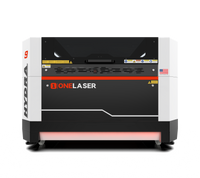
- If you want a business-ready cabinet platform, OneLaser Hydra 9 and Hydra 9 Gen2 are designed for makers who need speed, stability, and support (with Live Chat, US R&D support, and strong warranty coverage).
1) What “100W” really means
A 100W laser engraving machine typically refers to a CO₂ laser in a cabinet-style system. It’s a popular “sweet spot” for small business because it can:
- Cut faster than lower watt units
- Handle thicker non-metals more comfortably (with the right setup)
- Support small-batch production without constant babysitting
But here’s the catch: two “100W” machines can perform very differently depending on:
- Laser source type: DC glass tube vs RF metal tube
- Optics and beam quality: spot size, lens quality, alignment stability
- Motion system: servo vs stepper, rigidity, belt/rail quality
- Air assist + exhaust: affects cut quality, flame risk, and edge finish
- Cooling: stable power = consistent results and tube life
So think of wattage as one piece of your decision, not the decision.

2) Step-by-step: How to choose the right 100W laser cutter
Step 1: Define what you sell (materials + sizes + volume)
Before comparing brands, write down:
- Your top 5 products (e.g., layered signs, acrylic keychains, leather patches)
- Your main materials (wood, acrylic, leather, coated metals, etc.)
- Your typical product size (small tags vs big wall panels)
- Weekly volume (10 items/week vs 300 items/week)

This clarifies whether you need:
- More cutting power (thicker materials, faster production)
- More engraving quality (fine details, photos, small text)
- A bigger bed (home décor panels, furniture parts)
- Pass-through (long signs, boards, larger sheets)
Step 2: Pick the right laser type for your products
Most 100W systems in this category are CO₂, ideal for:
- Wood, acrylic, leather, paper, fabric, rubber, MDF, plywood (with safety considerations)
But for bare metals (deep engraving on stainless, aluminum), you typically need:
- Fiber laser (different wavelength, different job)
That’s why many small businesses like a platform that can evolve—either via upgrades or dual-source capability.
Example (business-focused):
- ONELASER HYDRA 9 is a cabinet dual-laser system pairing a 100W DC glass tube (great for cutting) with a 38W RF metal tube (great for fine engraving and speed on many materials).

- ONELASER Hydra 9 Gen2 is an RF-focused cabinet platform designed for high-speed engraving, with Smart Air Assist and optional Fiber & 100W CO₂ upgrades—useful if your product line expands into metal marking/engraving.

Step 3: Choose bed size based on your product mix
For small business, bed size impacts profit more than people expect. Ask:
- Do I need to place multiple items at once (batch production)?
- Do I make larger home décor panels, door signs, or furniture parts?
- Do I want to use standard sheet sizes efficiently?
A larger bed can reduce:
- Setup time (more items per run)
- Waste (better nesting)
- Manual repositioning (fewer “multi-pass” jobs)

- “How many units per run?”
- “How many runs per day?”
Step 4: Prioritize stability and motion quality (this is reliability)
If you’re selling products, “reliability” isn’t a buzzword, it’s your schedule and your reviews.
Look for:
- A rigid frame that resists vibration
- Smooth rails and consistent motion
- Repeatable positioning (critical for batch orders and jigs)
- Practical access for cleaning and maintenance
Step 5: Don’t underestimate air assist, exhaust, and cooling
These three systems heavily influence cut quality, consistency, and safety.
Air assist helps:
- Reduce charring
- Improve edge clarity
- Lower flame risk (especially on wood and acrylic)
- Keep the lens cleaner
Exhaust/ventilation is non-negotiable:
- Removes smoke and odors
- Protects optics and internal components
- Improves engraving clarity (less soot redeposit)
Cooling affects:
- Power stability
- Tube performance consistency
- Long-term reliability
Step 6: Build your workflow (software + camera + rotary + jigs)
A 100W laser engravers and cutters purchase is also a workflow purchase.
Consider:
- Your design software (and how you prep files)
- A camera system for placement (helpful for mass personalization)
- Rotary capability (tumblers, bottles, cylindrical items)
- Jig-based production (repeatability = speed + profit)
Step 7: Price the full ownership cost (not just “100W laser engraver price”)
When people ask about 100W laser engraver price, they often compare only sticker prices. For business buyers, total cost includes:
- Accessories (rotary, honeycomb/knife bed, lenses)
- Consumables (lenses, mirrors, filters if applicable)
- Maintenance time (cleaning, alignment checks)
- Downtime cost (missed ship dates)
- Support quality (how fast you get back to production)
3) What can I cut with a 100W laser cutter? (Material capability guide)
A 100W CO₂ laser cutting machine is excellent for many non-metal materials. Here’s a practical way to think about it:
Great fits (common small business materials)
- Acrylic (cast is usually easier for crisp engraving)
- Wood and plywood (quality varies; glue type matters)
- Leather (veg-tan and some finished leathers engrave well)
- Paper/cardstock (fast, clean—watch fire risk)
- Fabric and felt (edge sealing can be a benefit)
- Rubber stamps (with proper ventilation)

Possible but requires testing/controls
- MDF / composite woods (smoke, adhesive content)
- Certain plastics (some are unsafe, always confirm material safety)
- Coated metals (CO₂ can remove coating for marking, not deep metal engraving)
Not the right tool (in most cases)
- Bare metal deep engraving/cutting (use fiber for best results)
4) Reliable 100W laser engravers: what “reliable” actually means
When people ask for Reliable 100W laser engravers, they often mean:
- “I can run orders daily without constant troubleshooting.”
- “When something goes wrong, I can get help fast.”
- “My results stay consistent from job to job.”
So reliability comes from three pillars:
- Build quality + design choices: Rigid cabinet, stable motion, protected optics, clean airflow paths.
- Support + parts access: Fast troubleshooting, clear documentation, available replacement parts.
- Operator-friendly features: Good access panels, guided maintenance, safety interlocks, predictable calibration.
This is where a brand’s ecosystem matters. For example, OneLaser emphasizes business-ready ownership support like:
- OneLaser Live Chat (quick help when you’re mid-order)
- US R&D Support
- 3 Years Limited Warranty
- OneLaser community + in-depth learning articles
- Financing options and diverse payment methods
- Sales consultation calls to match your workflow to the right configuration

That combination often matters more than a slightly cheaper machine with slow support.
5) 100W vs lower watt laser engraver: when is 100W worth it?
If you’re comparing 100W vs lower watt laser engraver options (like 40W–80W CO₂), here’s a simple decision rule:
Choose lower watt if:
- You do mostly engraving on thin materials
- You’re prototyping, not producing
- You rarely cut thicker materials
- Budget is tight and volume is low
Choose 100W if:
- Cutting is a major part of your product line
- You want better throughput and scalability
- You make larger décor items or batch runs
- You value headroom (less pushing the machine to its limits)
6) Two business-ready options to consider: OneLaser Hydra 9 vs Hydra 9 Gen2
If your goal is to buy a 100W laser cutter for small business and stay flexible as your product line grows, these are worth a serious look:
ONELASER HYDRA 9 (Dual-laser hybrid)
Best fit when you want:
- Strong cutting capability (100W DC glass tube)
- Fine, fast engraving flexibility (38W RF metal tube)
- A cabinet platform built for maker production
Why makers like this setup: cutting + engraving needs often diverge. Dual sources can cover both without forcing compromises.

ONELASER Hydra 9 Gen2 (RF cabinet platform + upgrade path)
Best fit when you want:
- RF-driven high-speed engraving workflow
- Smart airflow features (like Smart Air Assist)
- The option to expand later with Fiber and 100W CO₂ upgrades
Why this matters: many businesses start with wood/acrylic personalization and later add metal products. Upgrade paths reduce “buy twice” pain.

Conclusion
It's not just a tool choice to buy a 100w laser engraver and cutter; it's also a business choice. If you only look at wattage when you buy, you could end up with a machine that works but slows you down because it doesn't always give you the same results, has a weak workflow, or is hard to get support for.
FAQs
1) How do I choose the right 100W laser cutter for my small business?
Start with your products and materials, then match:
- Laser type (CO₂ vs Fiber needs)
- Bed size (batching + material efficiency)
- Motion stability (repeatability for orders)
- Air assist/exhaust/cooling (quality + safety)
- Support and warranty (downtime protection)
If you’re cutting-heavy, 100W makes sense. If you’re engraving-heavy with fine detail, consider RF capability or a dual-source option.
2) Which brands offer the most reliable 100W laser engravers?
Reliability depends on build quality, support responsiveness, and parts availability. Many buyers look at industrial-grade brands, but for small businesses, the best “reliability” often comes from a brand that combines:
- A stable cabinet platform
- Strong support systems
- Clear training resources
If you want a business-ready approach with guided ownership support, OneLaser’s Hydra platform is designed around maker production and uptime.
3) What should I consider before buying a 100W laser engraver and cutter?
Use this checklist:
- What materials will I run weekly?
- Do I need cutting-first performance or engraving-first detail?
- What bed size fits my product + batch workflow?
- Do I have proper ventilation and air assist planned?
- What’s the warranty length and support process?
- What are typical maintenance tasks and how easy are they?
4) Can a 100W laser engraver cut through various materials effectively?
Yes, especially acrylic, wood, leather, paper, fabric, and rubber, which are not metals.
The performance depends on the type of material, its thickness, the amount of glue it has (for plywood/MDF), and the quality of your air assist and exhaust. Always do test cuts and adjust the settings to fit the batch of material.
5) What are the main differences between 100W laser engravers and other wattage models?
In general, 100W offers:
- Faster cutting and higher throughput
- More headroom on thicker materials
- Better production stability (less running at max limits)
Lower wattage models can be great for lighter engraving and thin-material cutting, but may slow down as order volume increases.