Liquid error (sections/image-banner line 171): invalid url input
One of the most adorable and classic Christmas decorations you can create with a laser machine is a laser-cut snow globe. Laser-cut wooden and acrylic snow globes employ layered designs to create a lovely 3D winter scene that feels cozy, handmade, and festive, in contrast to conventional glass snow globes filled with liquid.
Because they incorporate depth, storytelling, and seasonal charm into a single decorative piece, these projects are particularly well-liked for Christmas. Laser-cut snow globes are a great addition to your holiday lineup, whether you're making gifts, home décor, or goods to sell.
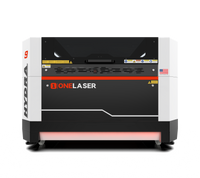
From file setup to final assembly, you will learn how to create a laser-cut snow globe using plywood, clear acrylic, and the OneLaser Hydra 9.
1. Why Laser Cut Snow Globes Are So Popular for Christmas
Laser cut snow globes have become a favorite among makers and small businesses for several reasons:
- They create a 3D layered effect that looks detailed and premium
- They are safer and more durable than glass snow globes
- They work perfectly as laser cut Christmas decorations
- They can be customized with names, dates, or messages
- They are ideal for wood-based holiday décor trends
Many creators use laser cut 3D snow globe files to quickly produce beautiful results without complex design work.

2. Materials and Tools You’ll Need
Before starting, gather everything you need so the process runs smoothly.
a. Materials
- 3mm plywood sheet
- 2 clear acrylic sheets (front and back layers)
- Laser cut snow globe file
- Wood glue or clear craft glue
- Stand slots
b. Equipment
- OneLaser Hydra 9
- LightBurn software
The combination of wood and acrylic gives your snow globe depth, contrast, and a polished finish that works beautifully under warm lighting.
3. Understanding the Layered Snow Globe Design
Most laser cut snow globe designs use multiple layers to create depth inside the globe. In this project, you’ll be cutting:
- Layer 1 – Mountains (background depth)
- Layer 2 – Houses (midground village scene)
- Layer 3 – Trees & Snowman (foreground details)
- Front Acrylic Layer (clear protective window)
- Back Acrylic Layer (engraved snow or Santa sleigh)
This layered structure is what turns a flat design into a 3D laser cut snow globe.
4. Step-by-Step: How to Make a Laser Cut Snow Globe
Let’s go through the process step-by-step so you can achieve professional-quality results
Step 1: Place Materials on the OneLaser Hydra 9
Start by placing your 3mm plywood sheet onto the workbed of the OneLaser Hydra 9. This sheet will be used to cut all three wooden layers:
- Mountains
- Houses
- Trees & Snowman
Next, prepare your clear acrylic sheets. These will be used later for the front and back layers of the snow globe.
Make sure all materials lie completely flat. If necessary, use magnets or clamps to prevent warping, especially with plywood.
The Hydra 9’s stable workbed and precise motion system help ensure consistent cutting across every layer.

Step 2: Import the Snow Globe File into LightBurn
Open LightBurn software and import your laser cut snow globe file.
Once loaded, check that:
- All layers are properly organized
- Engraving and cutting lines are assigned correctly
- Acrylic and plywood layers are separated
LightBurn allows you to easily manage multiple layers and materials in one project, which is especially helpful for multi-layer Christmas decorations.
If your file includes text or decorative elements, this is the time to personalize them.
Step 3: Laser Engraving and Cutting Process
Before starting any job, set up auto focus using the Hydra 9’s touchscreen panel. Proper focus is critical for clean cuts and crisp engraving.
a. Laser Engraving Settings
Engraving adds detail and storytelling to your snow globe.
Engrave on Layer 3 (Trees & Snowman)
This layer often includes fine details like facial expressions, textures, or snowfall effects.
Engraving Settings:
- Speed: 500
- Max Power: 30
- Min Power: 10
This creates light, clean engraving without burning the wood.

Engrave on the Back Acrylic Layer
Common designs include:
- Santa’s sleigh
- Falling snow
- Stars or moon details

Engraving on acrylic produces a frosted effect that looks beautiful when light passes through the snow globe.
b. Laser Cutting Settings
After engraving, move on to cutting all components.
Cutting Settings (Wood & Acrylic):
- Speed: 10
- Max Power: 95
- Min Power: 95

These settings ensure:
- Clean separation
- Minimal charring on plywood
- Smooth edges on acrylic
You will cut:
- 3 plywood layers (mountains, houses, trees & snowman)
- Front acrylic sheet
- Back acrylic sheet

The OneLaser Hydra 9 handles both wood and acrylic efficiently, making it ideal for holiday decoration projects that require mixed materials.
Step 4: Clean and Assemble the Snow Globe
Once all parts are cut, carefully remove them from the machine.
Cleaning
- Wipe plywood layers with a soft cloth
- Remove any masking from acrylic sheets
- Lightly sand edges if desired
Clean parts ensure a tight fit and a professional look.
Assembling the Layers
Assembly is where the snow globe truly comes to life.
- Start with the back acrylic layer
- Glue Layer 1 – Mountains on top
- Add Layer 2 – Houses
- Attach Layer 3 – Trees & Snowman
- Finish with the front acrylic layer
Apply glue sparingly and press each layer firmly into place. Let everything dry fully before handling.
Finally, insert the completed snow globe into the stand slots to keep it upright.

5. Why the OneLaser Hydra 9 Is Perfect for Snow Globe Projects
The OneLaser Hydra 9 is especially well-suited for layered Christmas décor because it offers:
- Consistent cutting depth across large designs
- Stable engraving for fine holiday details
- Auto focus for mixed material thickness
- Excellent acrylic engraving clarity
- Large working area for batch production
If you’re making laser cut wood Christmas decorations for selling or gifting, reliability and repeatability matter — and the Hydra 9 delivers both.

6. Creative Ideas for Laser Cut Snow Globes
Once you master the basics, you can easily expand your designs:
- Personalized family names
- Year-specific Christmas editions
- Village skylines
- Nativity scenes
- Winter forest landscapes
These designs are highly sought after in handmade and seasonal markets.

7. Selling Laser Cut Snow Globes
Laser cut snow globes are excellent products for:
- Christmas markets
- Online handmade shops
- Corporate holiday gifts
- Personalized family décor
They are lightweight, durable, and visually striking, making them easy to ship and display.
Many makers use one design file to produce multiple variations, increasing profit while saving time.
8. Common Mistakes to Avoid
Skipping autofocus before engraving or cutting
Using too much glue during assembly
Not separating engraving and cutting layers in LightBurn
Allowing plywood to warp during cutting
Taking a few extra minutes to prepare prevents wasted materials and rework.
9. FAQs
What is the most popular decoration for Christmas?
Popular Christmas decorations include ornaments, nativity scenes, snow globes, wreaths, and LED displays. Laser cut snow globes are especially popular because they combine tradition with modern craftsmanship.
What are good Christmas crafts?
Good Christmas crafts include laser cut ornaments, wooden signs, layered decorations, advent calendars, and personalized gifts made from wood or acrylic.
How do we decorate Christmas?
Christmas decorating often includes combining lights, ornaments, handmade décor, and themed pieces like snow globes to create a warm, festive atmosphere throughout the home.
Final Thoughts: A Timeless Christmas Project
Making a laser cut snow globe is more than just a DIY project — it’s a way to create something meaningful, decorative, and lasting for the holiday season.
With layered wood scenes, engraved acrylic details, and the precision of the OneLaser Hydra 9, you can produce stunning laser cut Christmas decorations that stand out year after year.
Whether you’re crafting for family, selling holiday products, or building your seasonal collection, laser cut snow globes are a project that never goes out of style.
If you want, I can also help you with:
- Product descriptions for selling
- Pinterest or Etsy SEO copy
- File optimization tips for snow globe designs
Just tell me what you need next.