Liquid error (sections/image-banner line 171): invalid url input
If you’ve ever tried to engrave (or cut) a big wall panel on a standard desktop laser, you already know the pain: you run out of bed space, alignment gets stressful, and long jobs expose every weakness in motion stability and airflow.
The good news is you don’t always need the “biggest machine possible.” What you need is the right workflow for large-format work, either a true large-bed laser or a desktop laser that scales with pass-through + conveyor tools.
Key Takeaway
For large-format wall art and decorative panels, choose a laser based on (1) bed size + pass-through workflow, (2) motion stability for long raster engraving, and (3) laser type for your detail level.
- OneLaser Hydra Series is the best choice when you need true large-bed capacity (up to ~62.99"" × 39.37""), production output, and consistent performance across oversized sheets.
- OneLaser X Series (XT / XRF) is ideal when you want a smaller footprint but still need to process longer boards using pass-through + Auto Conveyor Feeder, especially for repeatable product-style wall art.
1. Why large-format wall art requires a specialized laser
1.1 Size limitations of standard desktop lasers
Most desktop systems are designed for small products: coasters, tags, small signs, and batch runs of compact items. Large wall art breaks that assumption.
Common large-format scenarios:
- Long decorative boards (welcome signs, quote planks, name boards)
- Wall panels (MDF/plywood décor panels, architectural accents)
- Layered wall art (multi-piece assemblies that must align perfectly)
- Oversized acrylic panels (logos, backlit pieces, dimensional signage)

When the work doesn’t fit inside the bed, you need either:
- A large-bed laser, or
- A pass-through workflow that keeps alignment consistent as material advances.
1.2 Large jobs punish instability
Long raster engraving (big filled designs, photo-style shading, repeated patterns) magnifies:
- Frame vibration
- Belt/rail slop
- Beam inconsistencies
- Smoke and debris recirculating inside the enclosure
That’s why large-format machines must prioritize:
- Stable motion systems
- Consistent beam quality across the whole work area
- Efficient exhaust/airflow
- Workflow tools that reduce manual repositioning
2. Best OneLaser machines for large-format wall art and panels
2.1 OneLaser X Series – scalable, conveyor-ready, and studio-friendly
Best when you want a compact footprint but need to handle long boards and repeat production.
The OneLaser X Series (XT and XRF) has a 23.6" × 11.8" workspace, which is desktop-friendly, yet the workflow can scale with pass-through tools.

a. Why X Series works for long wall art (even with a smaller bed)
Pass-through + Auto Conveyor Feeder is what turns a “desktop” machine into a practical tool for long panels and repeatables. On the X Series specs list, OneLaser includes Auto Conveyor Feeder and Base Boost pass-through (6.30").
That combination is especially useful for:
- Long wooden name boards
- Multi-run decorative strips
- Wall art components you produce in batches (letters, repeated motifs, modular panels)

b. Laser options: XT vs XRF for wall art detail
- XT (55W CO₂ glass tube) is a strong all-around cutter/engraver for wood and acrylic projects, with built-in water cooling.
- XRF (38W RF metal tube) is built for higher-detail engraving thanks to the smaller spot size (0.07 mm) and faster engraving performance listed on the specs.
If your wall art style includes fine linework, tiny text, photo engraving, or clean shading, RF is a big advantage because detail is limited by spot size and consistency.
Discover the OneLaser X Series!
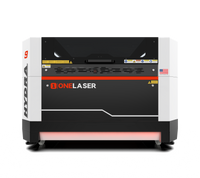
2.2 OneLaser Hydra Series – industrial power for oversized art and panels
Best when you want true large-format capacity and professional output.
The OneLaser Hydra Series is built specifically for large-scale jobs and production workflows, with bed options ranging from 28" × 20" up to ~62.99" × 39.37".
That top-end work area is exactly what large wall panels need:
- Full-size décor panels without tiling
- Oversized sheets with multiple designs nested in one job
- Big signage/wall art runs where speed and stability matter

a. Why Hydra is the best fit for long, high-stakes jobs
According to OneLaser’s Hydra Series details, the platform is designed around:
- High precision (≤ 0.01 mm positioning accuracy)
- Laser spot size: 0.25 mm (CO₂) / 0.07 mm (RF)
- Open passthrough design for oversized/lengthy materials
- Industrial cooling and safety systems aimed at longer operation sessions
In real terms: you’re less likely to fight banding, drift, inconsistent depth, or edge quality when the machine is designed for big work.

b. Hybrid flexibility for wall art businesses
Hydra models are available as CO₂, RF, or dual-laser hybrid systems (depending on configuration), and OneLaser positions the Hydra line as a “hybrid engraving-cutting” workhorse for scaling output.
For wall art, that matters because you often need:
- RF for premium engraving detail
- High-power CO₂ for faster cutting and thicker materials
2.3 X Series vs Hydra Series: which one should you choose?
a. Quick comparison table
|
Factor |
OneLaser X Series (XT / XRF) |
OneLaser Hydra Series (Hydra 7/9/13/16) |
|
Best for |
Small studios scaling up, long boards via pass-through, batch décor components |
True large-format panels, professional workshops, oversized sheet jobs |
|
Workspace |
23.6" × 11.8" |
28" × 20" up to ~62.99" × 39.37" |
|
Pass-through / workflow |
Base Boost pass-through + Auto Conveyor Feeder |
Passthrough design for large/long materials |
|
Laser detail (RF spot size) |
0.07 mm (XRF) |
0.07 mm (RF) |
|
CO₂ spot size |
0.25 mm (XT) |
0.25 mm (CO₂) |
|
Best “big panel” workflow |
Long-board pass-through projects, modular wall art |
Full-size wall panels in one pass, high-volume output |
|
Ideal buyer |
Etsy sellers, small décor brands, creators with limited space |
Production shops, décor manufacturers, sign/interior brands |
b. Who each machine is best for
Choose OneLaser X Series if you…
- Want a desktop footprint but plan to grow into long-board workflows
- Make repeatable wall art products (same designs, many variations)
- Need strong engraving performance (XRF) or a balanced CO₂ option (XT)
Choose OneLaser Hydra Series if you…
- Regularly work on oversized panels and want to avoid seams
- Need production reliability for long jobs and big batches
- Want the flexibility of high-power CO₂ cutting + RF detail engraving depending on configuration
3. Key features to look for in a large-format laser
3.1 Working area and pass-through support
If your typical wall panels are bigger than your bed, you need either:
- A bed large enough to do the job in one go, or
- A workflow that allows clean indexing without shifting (pass-through/conveyor)
Hydra explicitly supports large beds and passthrough workflows.
X Series supports pass-through and an Auto Conveyor Feeder workflow in its specs.
3.2 Laser type: RF vs CO₂ glass tube (DC)
For wall art:
- RF (metal tube) tends to win on engraving detail (small spot size, crisp lines), which is great for premium décor and fine artwork. Hydra and XRF list 0.07 mm spot size for RF.
- CO₂ glass tube is typically the workhorse for cutting and general engraving, with a larger spot size (Hydra lists 0.25 mm for CO₂).

3.3 Motion stability for long raster engraving
Large filled engravings expose banding if the machine can’t maintain smooth acceleration and consistent movement.
OneLaser lists 3G acceleration on the X Series specs, which is a real signal that it’s built for speed without losing control.
Hydra emphasizes advanced motion control and consistency for high-speed jobs.
3.4 Software workflow
For wall art businesses, design-to-production speed matters. Both Hydra and X Series list LightBurn compatibility.
LightBurn is popular for:
- Tiling strategies (if needed)
- Camera-assisted placement
- Batch layout / nesting
- Repeatable production settings
4. Materials commonly used for wall art and panels
4.1 Wood wall art
- Birch plywood (consistent, popular for layered pieces)
- MDF (smooth engraving surface, great for paint-filled looks)
- Hardwood panels (premium look; needs solid airflow and proper settings)
- Veneers (beautiful, but easy to scorch—airflow + focus matter)
Best machine fit:
- X Series for smaller components and pass-through boards
- Hydra for full sheet work and oversized panels
4.2 Decorative wall panels (architectural décor)
- Large MDF sheets
- Veneered panels
- Acrylic layers for dimensional designs
- Composite boards (must confirm material safety and fume profile)
Best machine fit: Hydra, because bed size and stability reduce risk and rework.
4.3 Acrylic wall art and panels
Acrylic is common in modern wall décor and signage-like wall art:
- Clear + engraved (frosted look)
- Painted or backed acrylic
- Layered dimensional builds
Best machine fit: CO₂ for cutting acrylic, RF for ultra-clean detail engraving (especially fine logos and linework). Hydra supports both types depending on configuration.
5. Practical tips for large-format wall art success
These apply no matter which machine you choose:
- Prioritize material flatness: Large sheets can warp. Use proper hold-down methods so focus stays consistent.
- Keep optics clean: Long jobs generate more smoke and debris. Clean optics prevents power drop and detail loss over a big area.
- Run a small test strip first: Before committing to a 2-hour engraving, validate contrast, depth, and airflow on a corner piece.
- Design for assembly when needed: If you’re using pass-through or modular builds, design alignment tabs or reference points so assembly stays perfect.
6. FAQs
Can I engrave oversized panels without seams?
Yes, if your machine has a large enough bed (Hydra’s larger configurations are built for this).
If you’re using a smaller bed, you can still do it with a pass-through workflow, but you’ll need a reliable indexing method and careful setup.
Do I need a conveyor feeder for wall art?
You don’t always need one, but it’s extremely helpful when:
-
You produce long boards repeatedly
-
You want consistent positioning without manual re-clamping
-
The OneLaser X Series lists Auto Conveyor Feeder support in its specs.
What laser wattage is best for large panels?
It depends on your material thickness and whether your work is mostly cutting or engraving. For large-format businesses, higher power generally helps maintain throughput, especially for cutting thicker panels, while RF is often preferred for premium engraving detail. Hydra supports high-power CO₂ options and RF options depending on model/configuration.
Is RF laser better for long engraving jobs?
RF can be excellent for long jobs where detail and consistency matter, because OneLaser lists a 0.07 mm RF spot size (Hydra and XRF), which supports sharp detail at scale.
Final thought
If your wall art is becoming larger, more premium, and more production-driven, the biggest upgrade isn’t just “more wattage.” It’s a workflow that stays accurate and consistent across big surfaces.
- For true oversized panels: Hydra Series is the cleanest path to professional large-format output.
- For scaling a small studio with long-board capability: X Series + pass-through/conveyor workflow can be a smart, space-efficient move.