




 Liquid error (sections/image-banner line 171): invalid url input
Scaling a craft business from making things by hand to making things in bulk is a big step, but it's also where a lot of makers run into big problems. When retailers, bulk buyers, or corporate clients get involved, what worked for weekend orders often doesn't work anymore. Choosing the right laser machine for crafts is now one of the most important business decisions you'll ever make.
This guide will help you pick a laser cutting and engraving machine that will help your business grow, stay reliable, and make money, without having to buy new equipment every year.
Key Takeaway
This article talks about technology options, return on investment (ROI) factors, and machine suggestions for engraving tumblers at home, cutting jewelry, making leather goods, or planning wholesale gift lines.

Why Craft Businesses Outgrow Hobby Lasers Faster Than Expected
Many makers start with a mini laser engraving machine, a DIY laser cutter kit, or a portable laser engraver. These tools are excellent for learning fundamentals, testing product ideas, and making small batches.
However, once orders increase, common problems appear:
- Long engraving times slow down fulfillment
- Inconsistent results across batches
- Limited bed size restricts product dimensions
- Overheating or downtime interrupts production
- Poor edge quality on acrylic or thick wood
- Safety and ventilation issues at higher workloads
This is the point where hobby tools stop being assets, and start becoming liabilities.
Scaling to wholesale requires a craft laser cutting machine that delivers speed, repeatability, safety, and long-term reliability.
Step 1: Understand the Core Laser Technologies (Diode vs CO₂ vs Fiber)
One of the biggest sources of confusion for buyers is laser type. Let’s simplify this clearly.
Diode Lasers (Entry-Level / Hobby)
Best for: Learning, light engraving on wood or leather, small crafts
Limitations:
- Cannot cut clear acrylic
- Slow engraving speeds
- Limited depth and contrast
- Poor for wholesale consistency
Diode lasers are fine for testing ideas, but diode laser limitations become obvious in commercial settings. They struggle with batch production and premium materials.
CO₂ Lasers (Best for Craft Businesses)
Best for: Wood, acrylic, leather, rubber stamps, signage, jewelry, gifts
Strengths:
- Cuts and engraves non-metals cleanly
- Works with clear acrylic (essential for LED signs)
- Fast engraving and cutting
- Excellent material versatility
For most craft businesses, a CO₂ laser cutting machine for crafts is the best foundation for scaling.
RF CO₂ Lasers (Professional Craft & Wholesale)
RF lasers are a premium form of CO₂ technology.
Advantages:
- Smaller beam spot = higher detail
- Faster response times
- Longer lifespan than glass tubes
- Exceptional photo engraving and fine text
If your products rely on detail, branding precision, or premium finishes, an RF laser engraver delivers superior results.
Fiber Lasers (Not for Most Craft Businesses)
Fiber lasers are excellent for bare metal engraving but poor for wood, acrylic, or leather. For craft-focused businesses, fiber is rarely the right investment early on.
Step 2: Match the Machine to Your Craft Products
Scaling successfully means choosing a laser that aligns with what you sell, not just what looks good on paper.
Popular Craft Products That Scale Well with CO₂ & RF Lasers
- Laser cut jewelry making (wood, acrylic, leather)
- Engraving tumblers at home (with rotary)
- Custom rubber stamp machine production
- Acrylic signage and LED night lights
- Leather patches and wallets
- Wooden home décor and wall art
- Wholesale gift items for retailers
If these describe your business, a desktop laser cutter or cabinet CO₂ laser is the right direction.

Step 3: Desktop vs Cabinet Lasers for Scaling
Desktop Laser Cutter (Early Scaling)
Desktop systems are ideal when you:
- Work from home or a small studio
- Produce small to medium-sized items
- Want fast setup and easy operation
- Need lower upfront investment
This is where the OneLaser X Series excels.
Cabinet / Industrial Laser (Wholesale Scaling)
Cabinet machines are built for:
- Batch production
- Larger materials
- Long daily run times
- Retail or B2B contracts
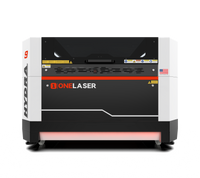
This is where OneLaser Hydra Series and Hydra Gen2 come in.
OneLaser X Series: Best Craft Laser for Scaling Small Businesses
The OneLaser X Series is designed for makers who are moving beyond hobby tools but aren’t ready for a full industrial footprint.
Why the X Series Works for Scaling
- Desktop laser cutter with industrial-grade motion control
- Available in RF (XRF) and CO₂ glass tube (XT) versions
- Excellent for jewelry, leather, acrylic, wood, and gifts
- Compatible with LightBurn (easy learning curve)
- Supports rotary engraving for tumblers and bottles
Ideal for:
- Etsy sellers growing into wholesale
- Personalized gift businesses
- Makers upgrading from diode lasers
- Home-based craft entrepreneurs
The X Series balances professional output with manageable cost, making it one of the best laser engravers for small business growth.
Discover the OneLaser X Series!
OneLaser Hydra Series: Built for Wholesale Production
When demand increases, speed and uptime matter more than anything.
The OneLaser Hydra Series is a craft laser cutting machine designed for continuous production.
Key Advantages
- Large working areas for batch jobs
- CO₂ + optional RF hybrid configurations
- Industrial cooling and airflow
- High engraving speeds with stable power delivery
- Designed for daily commercial operation
Best for:
- Wholesale décor manufacturers
- Sign shops
- Corporate gifting businesses
- High-volume leather and wood products
OneLaser Hydra Gen2: When Craft Becomes Manufacturing
Hydra Gen2 represents the next step—where a craft business becomes a production brand.
Why Hydra Gen2 Is Different
- Even higher speed and precision
- Improved airflow and debris management
- Optimized for reliability and scalability
- Reduced downtime = higher margins
For businesses asking “Is a laser business profitable in 2026?”—this level of equipment is how brands protect profitability as labor and outsourcing costs rise.
Step 4: Software, Safety, and Ease of Scaling
Software Compatibility
Look for machines that support LightBurn, which offers:
- Simple learning curve
- Photo engraving tools
- Batch job management
- Camera-based alignment
All OneLaser machines are LightBurn-compatible.

Safety Requirements (Critical for Scaling)
As production increases, safety becomes non-negotiable.
Key features to look for:
- Fully enclosed design
- Interlock systems
- Fume extraction compatibility
- Fire-resistant construction
Meeting laser safety requirements protects your team, your workspace, and your insurance coverage.
Step 5: Cost, ROI, and Financing
What Is the Cost of a Laser Cutting Machine?
Typical ranges:
- Entry desktop CO₂ lasers: ~$3,000–$5,000
- Mid-range cabinet lasers: ~$6,000–$10,000+
- Industrial systems: higher, depending on configuration
Best Commercial Laser Under $5000?
A well-configured desktop CO₂ or RF system like the OneLaser X Series often delivers the highest ROI at this price point.
Laser Cutter Financing for Business
Scaling doesn’t mean draining cash flow.
OneLaser offers financing options that allow businesses to:
- Start production immediately
- Pay monthly instead of upfront
- Align equipment cost with revenue growth
Financing is often the difference between staying small and scaling confidently.
Laser Cutter vs Laser Engraver: Do You Need Both?
Most CO₂ machines today function as laser cutters and laser engravers in one system.
If your products include:
- Cutting shapes → you need cutting power
- Branding, photos, logos → you need engraving precision
OneLaser systems are built to handle both without compromise.
How to Start a Laser Engraving Business That Scales
Successful scaling follows this pattern:
- Validate products with small runs
- Upgrade to a reliable CO₂ or RF system
- Optimize workflow and batch production
- Add wholesale or B2B clients
- Expand capacity—not complexity
The right laser machine for crafts supports this journey instead of limiting it.
FAQs
What is the best laser cutter for crafting?
A CO₂ laser is best for crafting due to its versatility with wood, acrylic, leather, and rubber. RF CO₂ lasers provide higher detail for premium products.
What is a good laser engraver for a small business?
A desktop CO₂ or RF laser with LightBurn compatibility and rotary support is ideal. The OneLaser X Series is a strong example.
What laser cut items sell best?
Personalized gifts, home décor, signage, jewelry, leather goods, and corporate gifts consistently perform well.
What is the cost of a laser cutting machine?
Expect $3,000–$10,000 depending on size, power, and features. Financing can reduce upfront strain.
Is a laser business profitable in 2026?
Yes—custom, personalized, and on-demand products continue to grow, especially with in-house production and wholesale margins.
Key Takeaway
Scaling a craft business to wholesale requires more than a hobby laser. A professional CO₂ or RF laser machine delivers the speed, consistency, and reliability needed for batch production.
Desktop systems like the OneLaser X Series support growing makers, while Hydra Series and Hydra Gen2 power full wholesale operations. Choosing the right laser protects margins, reduces downtime, and enables long-term business growth.