Liquid error (sections/image-banner line 171): invalid url input
A custom laser cut headphone stand is one of the most satisfying and functional DIY projects you can make with a CO₂ laser. Whether you’re organizing a gaming setup, building a clean workstation, or creating a personalized gift, a laser-cut stand is both stylish and practical.
Better yet, it’s simple to make — especially with the right machine and a well-designed file.
Key Takeaway
This guide walks you through every step of making a sturdy and modern headphone stand using the OneLaser Hydra 9, along with a 3mm dazzling acrylic sheet and your laser cut headphone stand template. By the end, you’ll have a professional-quality headphone and controller stand that looks amazing on any desk.
1. Why Make Your Own Laser Cut Headphone Stand?
Laser cutting lets you turn a simple sheet of acrylic or wood into a beautifully shaped stand with clean edges and perfect precision. A custom headphone stand is a great beginner-friendly project because:
- It requires only a few pieces to assemble
- You can use acrylic, plywood, MDF, or even mirrored sheets
- You can engrave decorations, names, or gamer tags
- It’s useful for gaming setups, home offices, or studio spaces
- It makes an excellent handmade gift or product to sell
Plus, using a laser cut headphone stand template ensures perfect fit and stability.
If you want to offer desk accessories or gaming-themed products in your shop, this is one of the easiest items to start with.

2. Tools & Materials You’ll Need
Before you begin, prepare the following:
Materials
- 3mm dazzling acrylic sheet (any vibrant or holographic color works beautifully)
- Headphone and phone stand template file
- Strong adhesive or clear acrylic glue

Equipment
- OneLaser Hydra 9 CO₂ Laser Machine
- LightBurn Software
- Cleaning cloth / microfiber towel
Using acrylic gives your stand a clean, modern aesthetic. It’s durable, sturdy enough to hold large headphones, and cuts beautifully with the Hydra 9.
3. Step-by-Step: How to Make a Laser Cut Headphone Stand
Let’s go through the process step-by-step so you can achieve professional-quality results
Step 1: Place the Acrylic Sheet Into the OneLaser Hydra 9
Place your 3mm dazzling acrylic sheet flat onto the Hydra 9’s workbed.
To prevent shifting during cutting:
- Make sure your sheet is lying flat
- Use small hooks, magnets, or clamps if needed
The goal is to eliminate any vibration or movement so your pieces cut cleanly.

Step 2: Import the Template File into LightBurn
Open LightBurn and import your laser cut headphone stand template.
Make sure to:
- Arrange the pieces on the workspace efficiently
- Check for kerf adjustment (if included in your template)
- Scale or reposition parts if you want a larger or smaller stand
A good template usually includes:
- Two vertical side/support panels
- One cross brace or base support
- Optional front piece or controller holder
- Optional decorative elements
If you want to customize your stand, LightBurn allows you to:
- Add engravings
- Insert logos or gamer tags
- Change shapes of panels
- Add cutout patterns
Engraving on dazzling acrylic will produce a frosted look, giving your stand a unique design.
Step 3: Cutting Process — Set Up the Hydra 9 and Choose Your Settings
Before cutting, press the Auto Focus button on the Hydra 9’s touchscreen panel.
Autofocus ensures the laser beam is at the perfect distance from the acrylic surface. Precise focus is essential for:
- Clean edges
- Smooth cuts
- Minimal melting
- Reduced smoke marks
Laser Cutting Settings for 3mm Acrylic (Hydra 9)
- Speed: 10 mm/s
- Max Power: 90%
- Min Power: 90%

These settings are ideal for:
- Thick, consistent cutting
- Polished edges
- High-clarity lines
If you want to experiment, you can perform a quick test cut to check edge quality before running the full template.

Tips for Cutting Acrylic Cleanly
- Leave masking on if your acrylic came pre-masked
- Use adequate ventilation
- Enable low-pressure air assist to prevent flaming
- Make sure your sheet lies flat to avoid defocusing
OneLaser Hydra machines are excellent for acrylic cutting because they provide controlled airflow and a stable beam path, reducing the risk of cloudiness along the edges.
Step 4: Clean, Assemble, and (Optionally) Paint the Stand
Once your pieces are fully cut:
a. Remove the masking film
If your acrylic has protective film, peel it off.
Use a microfiber cloth to wipe dust or residue.
b. Dry-fit the pieces before applying glue
Check that:
- The tabs slide smoothly into the slots
- The stand sits level
- The cross brace fits firmly
A correct fit ensures your headphone stand is balanced and strong.
c. Apply acrylic glue or a strong adhesive
Use glue sparingly — acrylic bonding adhesive is strong.
Hold pieces together for 10–30 seconds until they fuse.
d. Add paint or engravings (optional)
Many makers customize their stand with:
- Gamer tags
- Logos (PS5, Xbox, Nintendo, etc.)
- Channel names
- Characters or icons
- Minimalistic artwork
If you prefer a clean, clear acrylic aesthetic, painting is optional.

4. Why the Hydra 9 Is Great for Acrylic Desk Accessory Projects
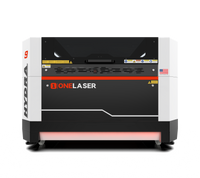
The OneLaser Hydra 9 is one of the most powerful mid-size CO₂ machines available. Its features make it ideal for cutting acrylic accessories like headphone stands, controller stands, LED bases, organizer trays, and more.
Key advantages include:
✔ Industrial-grade cutting power: Cuts acrylic like butter with clean, flame-polished edges.
✔ Auto-focus precision: Eliminates guesswork and improves consistency.
✔ RF + CO₂ hybrid capability: Supports both detailed engraving and powerful cutting.
✔ Stable cutting performance: No wobble, shifting, or inconsistent cuts — even on complex designs.
✔ Large workspace: Perfect for batch-making stand parts or producing multiple stands at once.
✔ Smooth DSP motion control: Ensures every curve and line comes out clean.
Whether you’re crafting for personal use or building inventory for your shop, the Hydra 9 helps you scale production without sacrificing quality.

5. Creative Ways to Customize a Laser Cut Headphone Stand
Making a headphone stand is just step one — the customization possibilities are endless.
a. Gamer-Themed Stands
- Add gaming logos
- LED base integration
- Controller holder add-ons
b. Personalized Gifts
- Engraved names
- Special dates
- Inspirational quotes
c. Workspace Aesthetic Stands
- Minimalistic geometry
- Clear acrylic with white engraving
- Frosted matte finishes
d. Multi-Function Desk Organizers
Combine your stand with:
- Phone holders
- Cable organizers
- USB docking stations
Because everything is laser cut, modifying the template file is easy.
6. How to Sell Laser Cut Headphone Stands
This is one of the best digital-download and physical-product items for laser sellers.
Here’s why:
- Small material cost
- Fast production time
- High perceived value
- Easy to brand
- Suitable for Etsy, gaming communities, and desk décor markets
A dazzling acrylic headphone stand typically sells for $18–$45 depending on customization.
7. Tips for Perfect Cuts Every Time
Here are some pro tips to improve quality and reduce material waste:
- Always autofocus before cutting: A small focus error can cause melting or uneven edges.
- Use low-pressure air assist: Too much air can create ripples or fogging in acrylic cuts.
- Avoid cutting too fast: Slow and strong is best for polished acrylic edges.
- Clean your lens regularly: A dirty lens reduces beam power and clarity.
- Keep acrylic flat: Warping causes unfocused edges, always secure your sheet.
8. Troubleshooting Common Acrylic Cutting Issues
a. Melting or stringy edges
→ Lower power or reduce speed
→ Check focus alignment
→ Use masking
b. Cloudy edges
→ Too much airflow
→ Try cutting with medium air assist
c. Burning smell
→ Check ventilation
→ Replace filters if needed
d. Pieces don’t fit together
→ Kerf compensation may be needed
→ Adjust slot size in LightBurn
Final Thoughts:
Creating a laser cut headphone stand is a fun, quick, and beginner-friendly project — but it looks like something you'd buy from a premium gaming brand.
Using the OneLaser Hydra 9 ensures you get:
- Clean, smooth edges
- Perfectly cut parts
- Consistent results
- The option to scale production easily
With the right template and material, you can create a stand that’s modern, stylish, and completely unique.